Residential in the dashboard
Four steps at app.ipv.rent, no API key needed. Account and balance - in Getting started.
1. Buy a traffic package
Section titled “1. Buy a traffic package”Buy Proxies → Residential. Choose the volume in gigabytes - it is the only choice at this step, everything else is set up later and for free.
The traffic you buy does not expire: whatever is not used stays on the package.
After the purchase the package stays in the setting up state for up to two minutes. This is normal, the traffic is already paid for.
2. Set up connections
Section titled “2. Set up connections”My Proxies → open the package, Settings section. These fields define how the proxy looks from the outside; you can change them as often as you like, it is free and uses no traffic.
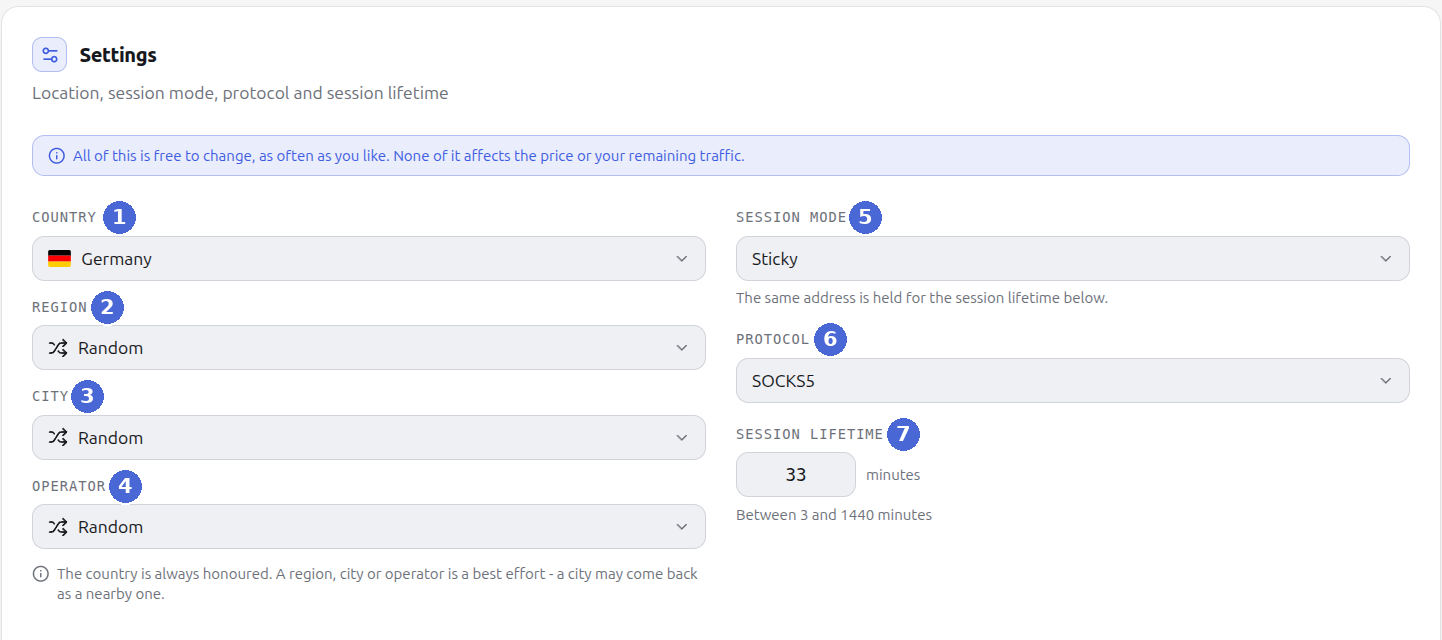
| No. | Field | What it defines | What to choose |
|---|---|---|---|
| 1 | Country | Country of the exit address. Always honored | The one the target site expects |
| 2 | Region | Narrowing within the country | Leave Random unless the task requires it |
| 3 | City | Narrowing to a city | Leave Random unless the task requires it |
| 4 | Operator | Network carrier (ASN) of the exit | Leave Random unless you need a specific carrier |
| 5 | Session mode | Rotating - a new address on every request. Sticky - one address is held for the whole session lifetime | Sticky for logins and carts, Rotating for scraping |
| 6 | Protocol | HTTP or SOCKS5 | HTTP, unless the tool asks for SOCKS5 |
| 7 | Session lifetime | How long the address is held in Sticky, from 3 to 1440 minutes | 30-60 minutes for working with accounts |
The country is always honored, while region, city and carrier are best effort: if the requested city has no free addresses, the exit will be from another city in the same country.
3. Get the proxy list
Section titled “3. Get the proxy list”Below the settings is the Proxy list section. It is rebuilt as soon as you change anything above.
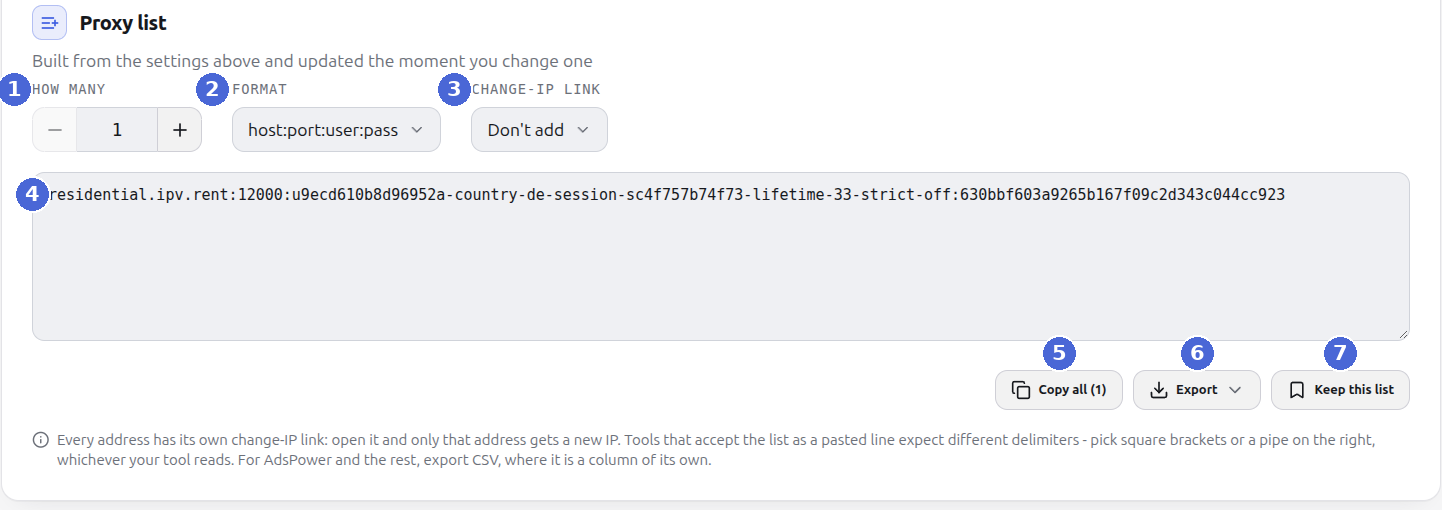
| No. | Element | What it does |
|---|---|---|
| 1 | How many | Size of the set, up to 500 lines |
| 2 | Format | How a line is written - see the table below |
| 3 | Change-IP link | Whether a line carries the change-IP link and with which separator |
| 4 | Lines of the set | Ready connections; rebuilt on any change of the settings |
| 5 | Copy all | Puts the whole set on the clipboard |
| 6 | Export | TXT - lines as on screen, CSV - a table for Excel and scripts, JSON - an array of objects |
| 7 | Keep this list | Remembers the set: the same addresses in the same order every time you open it |
Three formats, and the right one depends on where you paste it:
| Format | What it looks like | Where it fits |
|---|---|---|
host:port:user:pass | residential.ipv.rent:10000:USER:PASS | Antidetect browsers, proxy managers |
user:pass@host:port | USER:[email protected]:10000 | Tools that expect the credentials first |
protocol://user:pass@host:port | http://USER:[email protected]:10000 | curl, code, environment variables |
For AdsPower and other antidetect browsers, take CSV: there the change-IP link is a separate column and goes into the profile’s “change IP URL” field instead of being copied one by one.
A kept list does not change - when you open it again you get the same addresses in the same order, so you can bind profiles to them.
4. Paste it into your tool
Section titled “4. Paste it into your tool”Browser profile or proxy manager. Paste the line as is, choosing the format the tool asks for.
curl:
Python:
requests.get("https://api.ipify.org", proxies=proxies)The api.ipify.org response is your exit address: if it differs from your own IP, the proxy works.
IP change
Section titled “IP change”In Rotating mode the address changes by itself, on every connection - there is nothing to
release and no link.
In Sticky mode every line has its own change-IP link: open it and only that line gets a new
address. No authorization needed, so the link can be given to a browser profile or a script.
If a link leaks, the Replace all links button invalidates them all at once - the addresses stay the same, only the links change.
If something does not work
Section titled “If something does not work”| Symptom | Cause |
|---|---|
| Authentication fails on all lines | The package password was reissued - take the list again |
| Everything stopped working at once | The traffic is used up, check the counter and add volume |
| The address is not from the requested location | There are no free addresses there, the exit is given from the same country |
| The list is empty or says “setting up” | The package is still being set up, this takes up to two minutes |
More: Connection and IP change. Support: @ipvrent_support, [email protected].